LiveData 란 ?
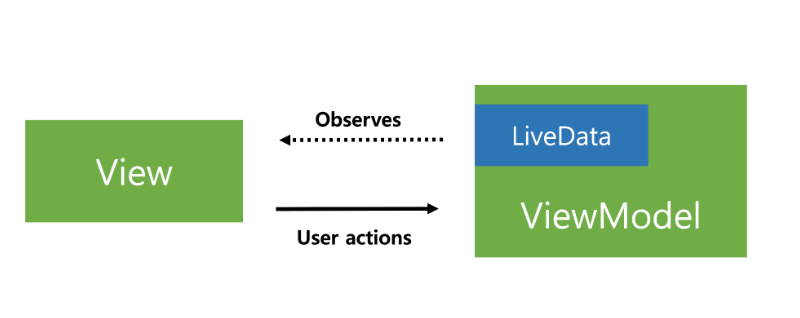
LiveData는 Data의 변경을 관찰 가능한 Data Holder 클래스.
관찰 가능한 일반 클래스와 달리 LiveData는 LifeCycle(생명주기)를 인식. 즉, Activity, Fragment, Service 등 다른 안드로이드 구성요소(컴포넌트)의 LifeCycle를 고려함.
LifeCycle 인식을 통해 LiveData는 활동상태에 있는 관찰자만 Update 하며, 활동상태는 Started 또는 Resumed을 의미
LiveData 장점 ?
1. UI와 Data 상태의 동기화
- LiveData는 관찰자 패턴을 따른다. LiveData는 기본 데이터가 변경 될 때 Observer 객체에 알린다. 이러한 Observer 객체를 사용하여 데이터가 변경 될 때 관찰자가 UI를 업데이트하므로 데이터와 UI의 상태가 일치한다.
2. 메모리 누수 없음
- 관찰자는 LifeCycle 객체에 결합되어 있으므로 연결 된 LifeCycle이 끝나면 자동적으로 삭제 됨.
3. Stop 된 Activity의 비정상 종료 없음
- Activity가 Back Stack에 있을 때를 포함하여 관찰자(Observer)의 LifeCycle이 비활성 상태에 있는관찰자는 어떤 LiveData 이벤트도 받지 않음.
4. 최신 데이터 유지
- LifeCycle이 비활성화 되면 다시 활성화 횔 때 최신 데이터 수신.
- 기기 회전과 같은 구성 변경으로 인해 활동 또는 프래그먼트가 다시 생성되면 사용 가능한 최신 데이터를 즉시 수신.
5. 리소스 공유
- 앱에서 시스템 서비스를 공유 할 수 있도록 싱글톤 패턴을 사용하는 LiveData 객체를 확장하여 시스템 서비스를 래핑할수 있음.
- LiveData 객체가 시스템 서비스에 한 번 연결되면 리소스가 필요한 모든 관찰자가 LiveData 객체를 볼 수 있음.
LiveData 객체 사용 시 따라야 하는 것 ?
1. 특정 유형의 데이터를 보유할 LiveData의 인스턴스 생성. 이 작업은 일반적으로 ViewModel 클래스 내에서 이루어짐.
2. onChanged() 메소드를 정의하는 Observer 객체 생성
- 이 메소드는 LiveData 객체가 보유한 데이터 변경 시 발생하는 작업 제어.
- Activity나 Fragment 같은 UI 컨트롤러에 Observer 객체 생성
3. observe() 메소드를 사용하여 LiveData 객체에 Observer 객체 연결
- observe() 메소드는 LifecycleOwner 객체 사용.
- Observer 객체가 LiveData 객체를 구독하여 데이터 변경에 관한 noti 받음.
- Activity나 Fragment 같은 UI 컨트롤러에 Observer 객체 연결
LiveData 사용 ?
1. ViewModel 클래스 생성
public class NameViewModel extends ViewModel {

    // Create a LiveData with a String
    private MutableLiveData<String> currentName;

    public MutableLiveData<String> getCurrentName() {
        if (currentName == null) {
            currentName = new MutableLiveData<String>();
        }
        return currentName;
    }

    // Rest of the ViewModel...
}
2. Activity에 Observer 생성
- nameObserver를 매개변수로 전달하여 observe(I) 호출하면 onChanged()가 즉시 호출 되어 저장된 최신 값 제공.
public class NameActivity extends AppCompatActivity {

    private NameViewModel model;

    @Override
    protected void onCreate(Bundle savedInstanceState) {
        super.onCreate(savedInstanceState);

        // Other code to setup the activity...

        // Get the ViewModel.
        model = new ViewModelProvider(this).get(NameViewModel.class);

        // Create the observer which updates the UI.
        final Observer<String> nameObserver = new Observer<String>() {
            @Override
            public void onChanged(@Nullable final String newName) {
                // Update the UI, in this case, a TextView.
                nameTextView.setText(newName);
            }
        };

        // Observe the LiveData, passing in this activity as the LifecycleOwner and the observer.
        model.getCurrentName().observe(this, nameObserver);
    }
}'개발 > Android' 카테고리의 다른 글
| [Android] Intent(인텐트) 정리 (0) | 2025.02.12 |
|---|---|
| [Android] ViewModel 정리 (0) | 2025.02.11 |
| [Android] 관찰자 패턴(Observer Pattern) (0) | 2025.02.11 |
| [Android] Fragment 정리 (0) | 2025.02.10 |
| [Android] Activity 정리 (0) | 2025.02.10 |


